L'Aide d'EMu est un outil d'Aide basé sur un navigateur qui fonctionne comme un site web moderne et réactif (s'adaptant à l'appareil sur lequel il est consulté), avec une navigation latérale (ou un menu coulissant sur les petits écrans) et un puissant utilitaire de requête.
Lorsque vous travaillez avec EMu, vous pouvez accéder à cette aide en ligne de plusieurs manières :
- Cliquez sur le bouton Aide dans le Centre de commande pour ouvrir l'aide EMu dans le navigateur web par défaut de votre appareil.
- Vous pouvez également sélectionner Fichier>Aide dans le ruban de tout module ouvert.
 Utilisez le bouton Qu'est-ce que c'est ? Qu'est-ce que c'est ?
The What's this? button is located just above the Ribbon on the far right of most modules. Il permet d'accéder directement à une rubrique de l'Aide :
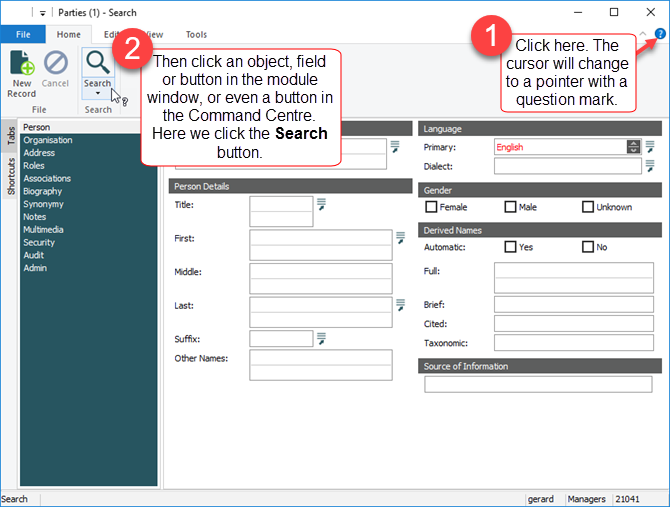
L'aide d'EMu s'ouvrira dans le navigateur web par défaut de votre appareil vers une page contenant des détails sur l'élément sur lequel vous avez cliqué. Dans cet exemple, des détails sur la façon d'effectuer une requête.
Langue anglaise (convention orthographique)
Previously, two English language versions of the EMu help were produced, one for the US and the one for other English speakers (this was a broadly International English (IE) variant); this was achieved by marking up the source documentation with language variables and condition statements, and duplicating screen captures of the EMu client whenever labels were different for different regions (Catalogue / Catalog; colour / color, etc.).
Accommodating English language variants introduces a degree of complexity that affects maintenance of the English documentation, as well as its translation; translators work with the underlying xml and the more mark-up in the code to accommodate language variants, the more complex the code is to work with. To simplify the maintenance and translation of the EMu Help, it has been decided to produce a single English version of the EMu Help based on the Oxford English Dictionary. As a result, users familiar with either of the previous versions of the EMu Help will notice changes to the spelling. While the IE version was broadly British English, it adopted ise verb endings (organise rather than organize, for example); as verb endings in British English can be either ize or ise, we have adopted the former as a concession to our users in the US, where ize is preferred.
Two English language variants are available in the EMu client: English and English US. There are minor differences in the spelling of some module names in the English and English US clients (notably, Catalogue / Catalog), and tab and field names (Organisation / Organization; Colour / Color, etc.); when the EMu Help indicates that you should open the Catalogue module, it implies the Catalog module, and a request to select Organization from the Party Type drop list should be understood as a request to select Organisation if that is how it is spelt in your EMu client.
While this change means a loss of English language localization of content based on region, it will simplify the maintenance and enhance the accuracy of the content for users in all regions.
Conseil : When following examples in the Help, be sure to update values to reflect spelling in your environment: for example, if the Party Type drop list in your Parties module has an Organisation Party Type, specify Organisation when building an import file that updates Parties records.
N'oubliez pas que
EMu est un système personnalisable et peut être adapté aux besoins de toute institution qui l'adopte.
Par conséquent, chaque mise en œuvre d'EMu peut différer. Dans cette documentation, une version générique d'EMu est utilisée. Bien que vous puissiez trouver que les captures d'écran ne correspondent pas à votre implémentation d'EMu dans tous les détails (les noms des champs, des onglets ou des modules peuvent différer par exemple), les techniques démontrées dans cette documentation sont pertinentes pour tous les systèmes EMu.
Gardez également à l'esprit qu'il existe souvent plusieurs façons d'accomplir une tâche dans EMu. Par exemple, un nouvel enregistrement peut être créé en cliquant sur Nouvel enregistrement dans l'onglet Accueil, en sélectionnant Fichier>Nouvel enregistrement dans le ruban d'un module, ou en utilisant le raccourci clavier, CTRL+N. La première fois qu'un processus est documenté dans cette aide, chaque méthode pour le mener à bien est indiquée. Par la suite, une seule méthode est indiquée (nous n'énumérons pas toutes les méthodes de création d'un nouvel enregistrement chaque fois qu'un processus vous demande de créer un nouvel enregistrement). Sachez qu'il existe souvent plusieurs façons d'accomplir la même tâche.
