The option to use OpenID Connect (OIDC) to authenticate access to Sapphire was introduced with Sapphire version 10. The OIDC protocol allows an application to delegate authentication to an external identity provider. The identity provider handles confirmation of the user's credentials in a web browser and then authorizes the application, via a secure mechanism, to allow access to some of the user's basic profile information such as their name or email address.
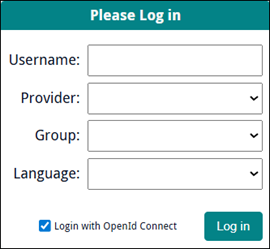
When setup for Sapphire, a Login with OpenID Connect checkbox will display in the Login box:
Full details about OIDC and its implementation in EMu can be found here.
The steps for configuring EMu for OIDC described under Register the application can be followed for Sapphire with the following changes:
- Set application type to Web application.
- Authorized JavaScript origin must be the URL where Sapphire is hosted, e.g.:
https://swanston.melbourne.axiell.com - Authorized redirect URI must be the full URL (not an IP address), and include
/sapphireat the end, e.g.:https://swanston.melbourne.axiell.com/sapphire
 Example: Google
- Go to the Google Cloud Console.
- Navigate to APIs & Services > Credentials.
- Locate your OAuth 2.0 Client ID.
- Choose Application type: Web application.
- In the client configuration:
- Authorized JavaScript origins: Add the base URLs of your web app (e.g.,
https://yourdomain.com). These are used to validate where requests originate from. - Authorized redirect URIs: Add the full redirect URLs (e.g.,
https://yourdomain.com/sapphire) where users are sent after authentication.
- Authorized JavaScript origins: Add the base URLs of your web app (e.g.,