
The mechanism for updating nested tables (tables within tables) is very similar to updating a single table except that nested tables have an outer row number and an inner row number.
We'll take a look at appending and prepending rows to an outer and inner tables in this exercise.
As before, we'll use the Events module:
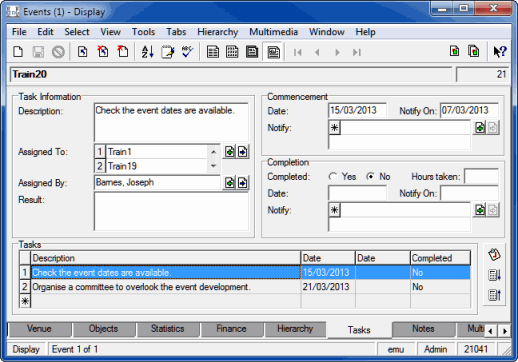
When a row is selected in the Tasks table (the outer table), values in the fields above are updated. Three of these fields above also happen to be tables (tables within a table, hence the name nested table) - Assigned To: (Task Information), Notify: (Commencement) and Notify: (Completion) - containing lists of Party names (they are thus both a table and an attachment field).
The fields used in this exercise are:
|
Field |
Back-end name |
|---|---|
|
IRN |
|
|
Description: (Task Information) |
|
|
Assigned To: (Task Information) |
|
|
Assigned By: (Task Information) |
|
|
Date: (Commencement) |
|
|
Notify: (Commencement) |
|
|
Completed: (Completion) |
|
- Locate the Events record you created earlier. You will have recorded the IRN of this record at Step 4 of Exercise 11.
The Tasks tab of your Events record will be similar to this: