Being a member of more than one group has implications for how Record Level Security (RLS) permissions are displayed in the EMu client.
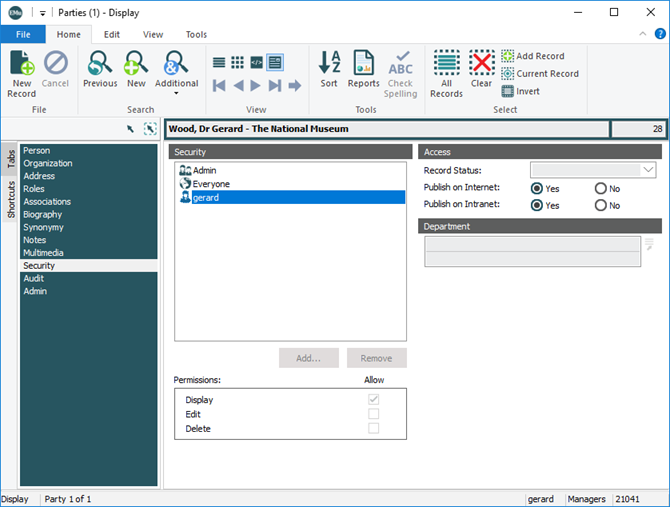
In this example, user gerard was logged in as a member of group Managers when the Parties module was opened (group ownership is indicated in the Status bar). The record level permissions indicate that gerard does not have permission to edit or delete the record, even though gerard is also in group Admin, which does have edit permission:
|
Name selected in the Security box: |
Permissions displayed |
|---|---|
|
The person currently logged in to EMu |
The permissions displayed are the group permissions that apply to the module. A module joins a group in one of two ways:
For example, if a user is in two groups, Managers and Admin, and the module was opened from the Command Centre when the user was logged in as a member of group Managers, then the permissions displayed are those of group Managers. This is as expected as the permissions reflect what operations (edit, delete) can be performed on the displayed record. |
|
Anyone else |
The permissions displayed are a merging of all the user's group permissions. For example, if a user is in two groups, Managers and Admin, where group Admin has permission to delete the record, but group Managers does not, then the permissions displayed will indicate that the user has delete permission. This is as expected as the user does have permission to delete the record, provided they log in or switch to group Admin. |
 Feedback